

How to Download a Scribd Document as PDF or PPTX: Step-by-Step Guide
Learn when to use PDF vs PPTX, how to process a Scribd link correctly, and what to do if the file takes longer to prepare.
Read guide
Download Scribd documents, books, and presentations as PDF files, or convert supported Scribd slides to editable PPTX presentations.
Scribd Downloader is a free online tool that lets you download Scribd documents, books, and presentations directly from a URL. You can save Scribd files as high-quality PDFs or convert presentations into editable PPTX format. No registration or login is required, and the tool works on both desktop and mobile devices.
Explore Our Tools download Scribd PDF documents, download SlideShare presentations.
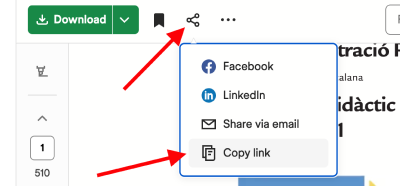
Visit scribd.com, open the document, book, or presentation you want to save, and copy its URL from the address bar.
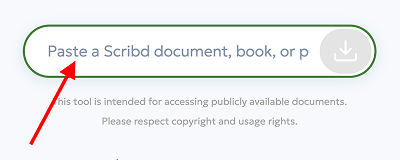
Paste the Scribd URL into the input field above and click the Download button.
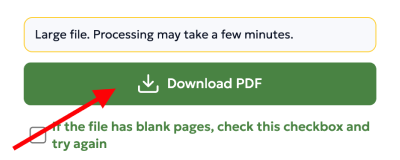
Download the Scribd document as a PDF. If it is a presentation, you can also generate and download a PPTX version.
Learn when to use PDF vs PPTX, how to process a Scribd link correctly, and what to do if the file takes longer to prepare.
Read guide
Avoid common mistakes: use the correct link, pick the right format, wait for processing, and organize files properly.
Read guideSome Scribd documents may generate blank pages or unreadable text during conversion because of how the original file is rendered or protected. If your downloaded PDF has blank pages, enable the blank-page fix option and try again. If the text looks broken or unreadable, use the text-repair option before downloading the final file.
The Scribd tool supports different types of online documents, including books, research materials, presentations, study files, and text-based documents.
The tool works with publicly available Scribd document, book, and presentation links. Private, removed, restricted, or subscription-only pages may not be available for download.
scribd.com/document/...scribd.com/doc/...scribd.com/presentation/...Some Scribd documents may be unavailable due to privacy settings, regional restrictions, or removed content. In some cases, documents may require additional processing time depending on file size and format.
Presentation-based Scribd files may include slides, educational materials, business reports, and visual documents. PPT and PPTX support allows users to work with presentation content more efficiently across desktop and mobile devices.
After downloading a Scribd document as a PDF, you can open it offline on your phone, tablet, laptop, or e-reader. This is useful for study notes, research papers, reports, and presentations that you need to review later without an internet connection.
The Scribd tool works with modern browsers on desktop and mobile devices, including Chrome, Firefox, Safari, Edge, and Android browsers.
Use Scribd as a practical workflow tool: set clear goals, extract actionable notes, and build a focused personal library.
Read moreScribd is for documents, Everand is for ebooks and audiobooks, and SlideShare is for presentations. Here is the practical breakdown.
Read moreA practical overview of Scribd: what content it hosts, how reading/uploading works, subscriptions, and how it differs from Everand and SlideShare.
Read moreScribSave is built for users who want a simple and clear way to work with online document platforms. Each tool is designed to be easy to use, while our guides explain common issues, supported formats, access limits, and practical document workflows.
Whether you are a student, teacher, researcher, or professional, ScribSave helps you save time by combining useful tools with helpful information in one place.
Download Scribd documents, books, and presentations without strict limits. Save as many Scribd files as you need with no subscriptions or hidden restrictions.
Download from Scribd instantly without creating an account. Simply paste the URL and save your document in seconds.
Download Scribd PDFs with clear text and sharp images. Choose the quality level that best suits your needs, from maximum clarity to smaller file sizes.
Our Scribd document downloader is optimized for speed and security. We use encrypted connections and never store your downloaded files.
Feedback from ScribSave users who worked with Scribd documents, presentations, PDF files, and offline reading.
“Other tools on the internet were showing blank pages, but ScribSave gave exactly what I wanted.”
“It works very well, great experience and fast. Thanks broo.”
“No bug — this worked perfectly on a 4 page text-only document. Thanks.”
“Works way too well, so impressive FOR REAL :)”
“Pretty good and fast.”

Download Scribd documents in PDF format. Presentations can also be converted to PPTX for easy editing.
Choose high, balanced, or compact quality before downloading to control file size and output clarity.
Preview Scribd pages directly in your browser before downloading, so you know exactly what you are saving.
Download multiple Scribd documents one after another without interruptions, even with large files.
All downloaded files are clean and watermark-free, preserving the original Scribd content.
You can use the Scribd downloader on Windows, macOS, Linux, Android, or iOS. No installation required.
Save Scribd study materials, lecture notes, and academic documents for offline reading and exam preparation.
Download Scribd presentations and documents for classroom use or sharing with students.
Save Scribd reports, case studies, and presentations for meetings, research, and professional development.
Download academic Scribd documents, conference materials, and research presentations for reference and archiving.
Explore books, guides, and online documents from popular document-sharing platforms in a more convenient way.
Find simple tools and practical guides for working with online documents without complicated setup or software.
Ideal for reading and printing. PDF files preserve the original layout across devices.
Best for editing presentations. PPTX files are generated from Scribd slides.