
Scribd Downloader
Download Scribd documents, books, and presentations as PDF files, or convert supported Scribd slides to editable PPTX presentations.
This tool is intended for accessing publicly available documents. Please respect copyright and usage rights.
 Free to Use
 Secure Connections
 No Registration Required
We are improving this tool to make it faster and more convenient for you.
If you have any suggestions or have found a bug, please let us know here.
If an error occurs, please try again a little later.
The best way to say thanks is to share it on social media
Download Scribd Documents as PDF or PPTX
Scribd Downloader is an online tool for saving publicly accessible Scribd documents, books, and presentations from a link. It can export documents as PDF and convert supported presentations into editable PPTX files. The tool works in a browser on desktop and mobile, without registration or software installation.
Explore More Document Downloader Tools
You can also use ScribSave to download SlideShare presentations and save Studocu documents as PDF or DOCX.


How the Scribd Tool Works
Copy the Scribd Link
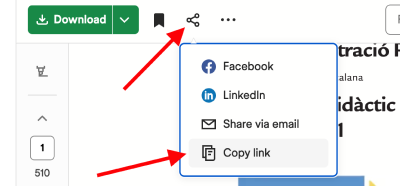
Open the Scribd document, book, or presentation you want to save, then copy its URL from your browser address bar.
Paste the URL
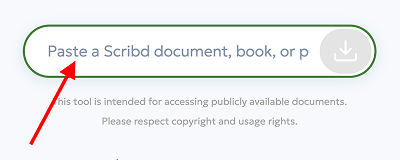
Paste the Scribd link into the field above and click the Download button to start processing the file.
Download Your File
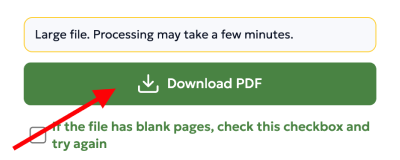
Save the Scribd content as a PDF. For supported presentations, you can also generate a PPTX file for easier editing.
Fix Blank Pages or Broken Text in Scribd PDFs
Some Scribd documents may generate blank pages or unreadable text during conversion because of how the original file is rendered or protected. If your downloaded PDF has blank pages, enable the blank-page fix option and try again. If the text looks broken or unreadable, use the text-repair option before downloading the final file.
Supported Document Types
The Scribd tool supports different types of online documents, including books, research materials, presentations, study files, and text-based documents.
- PDF documents
- PPT and PPTX presentations
- Study materials
- Reports and ebooks
Supported Scribd URL Types
The tool works with publicly available Scribd document, book, and presentation links. Private, removed, restricted, or subscription-only pages may not be available for download.
- Document pages:
scribd.com/document/... - Book or legacy document pages:
scribd.com/doc/... - Presentation pages:
scribd.com/presentation/...
Common Access Issues
Some Scribd documents may be unavailable due to privacy settings, regional restrictions, or removed content. In some cases, documents may require additional processing time depending on file size and format.
Working with Scribd Presentations
Presentation-based Scribd files may include slides, educational materials, business reports, and visual documents. PPT and PPTX support allows users to work with presentation content more efficiently across desktop and mobile devices.
Save Scribd Files for Offline Reading
After downloading a Scribd document as a PDF, you can open it offline on your phone, tablet, laptop, or e-reader. This is useful for study notes, research papers, reports, and presentations that you need to review later without an internet connection.
Browser Compatibility
The Scribd tool works with modern browsers on desktop and mobile devices, including Chrome, Firefox, Safari, Edge, and Android browsers.
Key Features of the Scribd Tool
Simple Scribd Downloads
Save Scribd documents, books, and presentations whenever you need offline access, without complicated setup or extra software.
No Account Required
Use the Scribd downloader without signing up. Paste a URL, process the file, and download it directly from your browser.
High-Quality Output
Export Scribd PDFs with clear text, sharp images, and preserved page layout. Choose the output quality that best fits your needs.
Fast & Secure Processing
The Scribd downloader is built for quick processing and safe browser-based use. Files are handled securely and are not stored permanently.
What Users Say About This Tool
Feedback from ScribSave users who worked with Scribd documents, presentations, PDF files, and offline reading.
“Other tools on the internet were showing blank pages, but ScribSave gave exactly what I wanted.”
Aryan
“It works very well, great experience and fast. Thanks broo.”
Dj
“No bug — this worked perfectly on a 4 page text-only document. Thanks.”
Bruce
“Works way too well, so impressive FOR REAL :)”
Ozy
“Pretty good and fast.”
Makayla
Key Benefits

PDF and PPTX Export
Download Scribd documents in PDF format, and convert supported slide-based presentations to editable PPTX files.
Adjustable Quality
Select high, balanced, or compact quality to control the final file size and visual clarity before downloading.
Preview Before Downloading
Preview available Scribd pages in your browser before saving the file, so you can confirm you are downloading the right document.
Smooth File Processing
Process multiple Scribd links one by one with a clean workflow that stays reliable even for longer documents.
Clean Downloaded Files
Export files in a clean, readable format that keeps the original document content easy to view, print, or share.
Works on Any Device
Use the Scribd downloader on Windows, macOS, Linux, Android, or iOS. All you need is a modern web browser.
Who Is This Tool For?
Students
Save Scribd study guides, lecture notes, textbooks, and academic materials for offline reading and exam preparation.
Teachers & Educators
Download Scribd documents and presentations for lesson planning, classroom use, or sharing materials with students.
Business Professionals
Keep Scribd reports, case studies, templates, and presentations available for research, meetings, and professional reference.
Researchers
Save academic documents, conference slides, white papers, and research materials from Scribd for citation review and archiving.
Available Download Formats
Best for reading, printing, and archiving. PDF files preserve the original layout across screens and devices.
PPT / PPTX
Best for editing slide decks. Supported Scribd presentations can be converted into editable PPTX files.
Frequently Asked Questions
Yes, the Scribd downloader is free to use for supported publicly available Scribd links.
There are no fixed daily limits for normal use, but fair-use restrictions may apply to keep the service fast and stable.
Documents can be downloaded as PDF. Supported Scribd presentations can also be converted to PPTX.
Yes. You can choose high, balanced, or compact quality before downloading, depending on whether you prefer clarity or smaller file size.
Yes. The tool uses secure processing and does not permanently store your downloaded documents or personal files.
Yes, the Scribd downloader works on smartphones, tablets, laptops, and desktop computers through any modern browser.
No. You can paste a Scribd URL and download supported content without logging in or creating an account.
Downloaded files are exported in a clean, readable format whenever possible, depending on the source document.
Most files are processed quickly, although larger documents or slower internet connections may take longer.
Yes, you can preview available Scribd pages directly in your browser before saving the final file.
Only download documents you own, have permission to use, or are legally allowed to save. Always respect copyright and Scribd’s terms.
Check that the Scribd URL is correct, publicly accessible, and still available, then paste the link again and retry.
Yes. Supported Scribd presentations can be converted to editable PPTX files when the source format allows it.
Some files may render incorrectly during conversion. Enable the blank-page fix option and try processing the link again.
Text can appear broken when the source document uses unusual encoding or rendering. Use the text-repair option before downloading again.
The tool supports publicly available Scribd document, book, and presentation links. Private, removed, or restricted pages may not be available.